Custom Headshot Backgrounds: What They Are, How They Work, and When to Use Them | Victoria, BC
TL;DR
Your headshot background does more than you think. In this post, I walk through the custom background options available after your session, including a curated library of modern office and workspace settings, and the option to use your own company backdrop or a location that reflects your brand. Whether you're updating your LinkedIn profile or looking for a cohesive look across your team, a custom background gives you flexibility without requiring a reshoot. If you want a headshot that works in multiple contexts, this is worth reading.
The backdrop behind you in a headshot does more work than most people realize.
It sets a context. It signals an environment. Before someone reads your name or your title, they've already absorbed something about where you operate and what calibre of professional you are.
Most studio headshots are taken against a clean, neutral background, and that's intentional. A solid backdrop keeps the focus on your face, which is exactly where it should be. But a plain grey or white background doesn't always match the context you need. Your industry, your brand, the platform where the image is going to live, those things matter.
That's where custom background options come in.
What Custom Backgrounds Actually Are
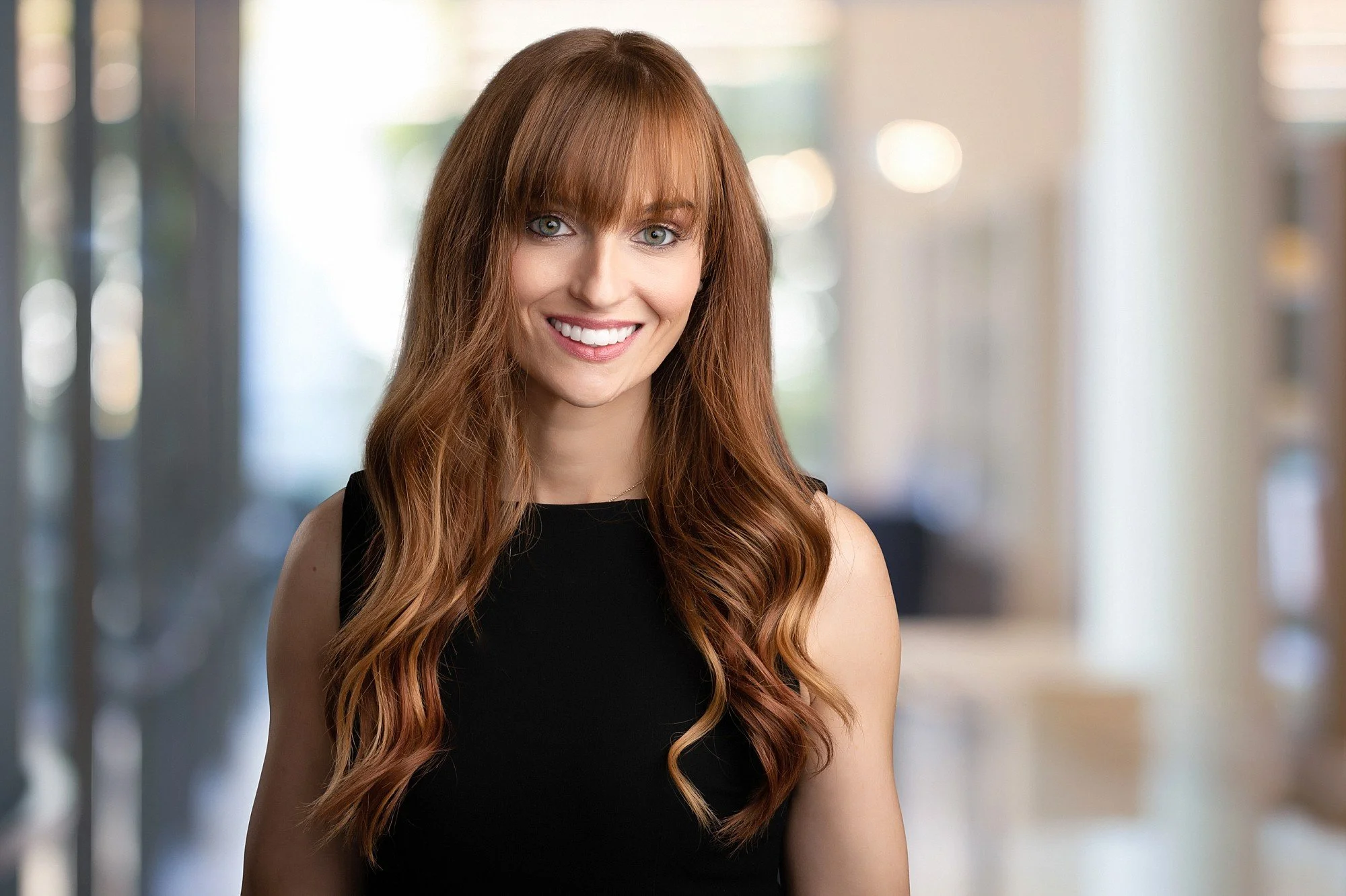
A custom background is exactly what it sounds like. After your session, instead of keeping the original studio backdrop, your image is edited to place a different background behind you. That might be a modern office setting, a sleek workspace, a branded environment your company uses, or even a specific location you've provided.
The process happens in post-production, after your session, through professional editing. No green screen required during the shoot. The background is replaced cleanly so the finished image looks natural and cohesive, not composite.
How the Process Works
Here's how it goes at Erin Clayton Photography. You come in for your session. We photograph you against a clean studio backdrop with professional lighting. Once your gallery is ready, you choose your favourite images for retouching.
Custom backgrounds are available as an add-on service at an additional fee. If that's something you'd like to include, reach out before booking and I'll send you the details. From there, you'll select from a curated library of professionally designed settings, modern offices, executive workspaces, architectural interiors, environments that read as polished and credible across industries. If your company already has a specific backdrop it uses for team consistency, you can provide that and I'll work with it.
The result is a headshot that looks like it was taken in a real, professional space, with all the quality of a properly lit studio portrait.
Why the Background Matters More Than You Think
Every visual detail in a professional image either adds to or subtracts from the impression you make.
A plain white background can read as clean and professional. It can also read as clinical or generic, depending on your industry and the context. A warm office setting communicates that you work in an environment of substance. A modern workspace signals a certain calibre of operation.
For executives, lawyers, surgeons, real estate leaders, senior corporate professionals, and anyone who relies on their image to open doors in Victoria BC and across Canada, the context behind you carries weight. Your LinkedIn profile, your company website, your speaker bio, your board nomination package. They're all making an impression before you ever walk into a room.
Who This Option Is For
Custom backgrounds work well in a few specific situations.
If your headshot will live on your company website alongside colleagues who were photographed against a specific backdrop, a custom background lets your session match the team look without requiring everyone to be in the same room on the same day.
If you're a solo professional building a personal brand, a thoughtfully chosen background gives your headshot the flexibility to feel at home in multiple contexts, from a formal bio to a conference speaker profile to a media kit.
If you're refreshing your LinkedIn presence and want something that reads as substantial without being generic, background choice adds that layer without changing anything about the actual photo.
Teams benefit significantly from this option too. When organizations book on-site team headshots in Victoria BC, custom backgrounds can create a cohesive, polished look across the full team, even when sessions happen on different days or at different locations.
How to Choose the Right One
There's no single correct answer. It depends on your industry, your brand, and where the image is going.
A corporate attorney or financial advisor typically looks most credible against a clean, traditional office setting. Something professional and undistracting, where the background recedes and the person stays front and centre.
A tech leader or creative director might choose something with more architectural interest, still polished, but with a slightly more modern sensibility.
An entrepreneur building a personal brand might lean toward something that reflects their actual work environment and feels authentic to how she shows up in the world.
The guiding principle is simple. The background should support the impression you're making, not compete with it. If someone notices the backdrop before they notice you, it's doing too much.
During the booking process, I'm happy to talk through what works best for your specific context. That's part of the experience.
Related Reading
If this was useful, these posts are worth your time too:
Considering headshots for your whole team? Getting Ready for Your Team Headshots covers tips for planning your team’s headshot day to help ensure everything runs smoothly and that no details are forgotten.
If your organization hosts conferences or events with speakers or leadership panels, On-Site Headshots: What to Know Before You Book walks through exactly what that process looks like from start to finish.
One of the most common questions I hear before a session: How Much Should I Smile in My Headshot? The answer is more nuanced than you'd expect, and it makes a real difference in how the final image reads.
Ready to Book Your Session?
If you're a professional in Victoria BC ready to update your headshot and want the flexibility that custom background options offer, I'd love to work with you.
Every session includes premium human retouching, colour and black and white versions, print and web resolution files, and active direction throughout. The custom background option can be added at the time of booking.
Book your headshot session here or reach out with questions and I'll get back to you.


Available Options (Or You Can You Use Your Own Company Provided Backdrop)


